To create professional-looking law firm videos, fix four things in this order: lighting, audio, framing, and background. Place a soft key light 45 degrees off your face at eye level, use a lavalier or USB microphone instead of your camera's built-in mic, set the camera at eye height and frame yourself chest-up slightly off-center, and record against a clean, uncluttered wall. A current smartphone plus roughly $250 of light and audio gear produces footage that reads as credible to prospective clients.
Key Takeaways
- Audio beats camera. A $70 lavalier microphone raises production value more than a $1,500 camera does. Viewers forgive soft focus. They click away from echo and hiss.
- One light fixes most of it. A single diffused key light 45 degrees off-center, at or just above eye level, about three feet away, eliminates the under-lit, top-lit look that makes office video read as amateur.
- Poor quality is a trust problem, not an aesthetics problem. In a Brightcove consumer survey, 62% of viewers said a poor-quality video left them with a negative perception of the brand behind it.
- Look at the lens, not the screen. This is the single most common on-camera mistake attorneys make, and it is the difference between eye contact and a witness who won't meet the jury's eyes.
- Frame chest-up, eyes on the upper third. Leave about a fist of headroom, place your eyes roughly one-third down from the top of the frame, and sit slightly off-center.
- Keep attorney explainers to 60–180 seconds. Educational videos under five minutes averaged roughly 50% engagement in Wistia's 2026 State of Video Report. The shorter the video, the higher the completion rate.
Why the Production Quality of Your Video Is a Conversion Issue
Video quality changes whether a prospective client believes you can handle their case. A personal injury claim is a high-stakes, one-time hiring decision made by someone who is often injured, stressed, and comparing three firms in a single sitting. They cannot evaluate your trial record. They can evaluate whether you look and sound like someone who has their act together and they do that within a few seconds.
This is why the technical floor matters more in legal than in most industries. In a Brightcove survey of consumers who regularly watch online video, 62% said they formed a negative perception of the brand after a poor-quality video experience. The viewer does not think "bad microphone." They think "small operation."
The good news is that the gap between amateur and professional is narrow and almost entirely mechanical. You do not need to compete on cinematography. You need to clear a credibility bar, then get out of the way of the message.
Although digital audio processors have improved in quality and capability, a bad recording will cost far more in time and effort to fix than just getting a good recording in the first place
Everything below is the mechanical part. The message and channel strategy live in our video marketing strategy for lawyers guide.
What Makes a Law Firm Video Look Professional?
A law firm video withfour correct technical elements looks professional: even, soft light on the face; clean audio with no room echo; an eye-level camera framed chest-up; and an uncluttered background.
Fix those four and the footage reads as intentional. Miss any one of them and the whole thing reads as a webcam call, no matter how good the other three are.
| Element | What amateur looks like | What professional looks like | Time to fix |
| Lighting | Overhead office light casting shadows under the eyes and nose; a bright window behind you | One soft key light 45° off-center at eye level, plus a fill or reflector on the shadow side | 15 minutes |
| Audio | Built-in camera mic, hollow room echo, HVAC hum, keyboard clicks | Lavalier clipped 6–8 inches below the chin, or a USB mic just outside frame; soft furnishings in the room | 5 minutes |
| Camera & framing | Laptop webcam angled up from the desk; head dead-center with empty space above | Rear phone camera or mirrorless at eye height on a tripod; chest-up, eyes on the upper third of the screen | 10 minutes |
| Background | Cluttered desk, stacked banker boxes, half-open door, a wall of unread mail | Clean neutral wall, or an uncluttered depth-of-office shot with 4–6 feet behind you | 20 minutes, once |
Fix these in order: Lighting and audio account for most of the perceived difference, cost the least, and carry over to every video you record after the first one.
Lighting Setup for Lawyer Videos: The Fastest Fix
For the fastest lighting setup for lawyer videos, position one soft key light 45 degrees off-center from your face, at or slightly above eye level, roughly three feet away, with a diffuser or softbox in front of it.
That single change removes the raccoon-eye shadows that overhead office lighting creates. Add a weaker fill light on the opposite side to soften the remaining shadow, and you have a setup that flatters nearly every face on camera.
The three-point setup, explained in plain terms
- Key light: Your main source. 45 degrees off the lens axis, eye level or a few inches above, about an arm's length plus a foot away, always diffused. A bare bulb or bare LED panel creates hard, unflattering edges.
- Fill light: The opposite side, at roughly half the key's brightness. Its only job is to lift the shadow so half your face is not in the dark. A white foam board or a bounce reflector does this for under $20.
- Back light (hair light): Behind and above you, aimed at your shoulders and hair. It separates you from the wall and is the element most in-house setups skip. It is also the one that most reads as "a crew was here."
The Free Version: Window Light
Sit facing a window, roughly three to five feet back, with the window at a 45-degree angle to your face rather than straight on. North-facing windows give the most consistent light. Two conditions apply: Never put the window behind you, and never rely on window light for a video you have to re-record at a different time of day.Direct sun moves and clouds change your exposure mid-take.
Lighting Options Compared
| Option | Typical cost | Best for | Watch out for |
| Window light | $0 | Testing the format before you invest; for occasional recording | Light changes by the hour and by the weather; no consistency between takes |
| Ring light (10–18") | $40–$120 | Talking-head clips, short-form social, for quick client updates | Circular catchlights in the eyes and heavy glare on glasses |
| Single LED panel + softbox | $150–$350 | The best value for most firms: for one attorney, seated, at a desk | Needs a stand and floor space; place it off-axis, not straight on |
| Two-point (key + fill) | $300–$600 | Regular weekly recording; for two-person interviews | Balance the fill at roughly half the key or the face goes flat |
| Three-point kit | $600–$1,200 | A dedicated in-office studio corner used by multiple attorneys | Real setup time unless you mark the stand positions on the floor |
Prices are approximate U.S. street prices as of 2026 and are given as ranges for planning, not as endorsements of specific models.
Equipment for Lawyers to Record Videos: Audio First, Camera Second
The most important equipment for lawyers recording videos is a microphone that sits close to the mouth, whether a lavalier clipped 6 to 8 inches below the chin or a USB condenser just outside the frame.
Viewers tolerate a slightly soft image. They will not tolerate echo, hum, or a voice that sounds distant. If you buy one thing, buy the microphone.
| Microphone type | Typical cost | Best for | Trade-off |
| Built-in phone / camera mic | $0 | Nothing you plan to publish | Picks up the whole room, including audible echo in hard-surfaced offices |
| Wired lavalier | $25–$80 | Seated, single-attorney explainers at a desk | Cable management. It tethers you to the camera |
| Wireless lavalier system | $100–$250 | Walking shots, courthouse-steps clips, two-person interviews | Batteries and pairing; clothing rustles if clipped badly |
| USB condenser (desk) | $80–$180 | Recording at a desk where the mic can sit just below frame | Picks up desk bumps; needs a boom arm or shock mount |
| Shotgun on camera | $120–$300 | Run-and-gun office B-roll where a lav is impractical | Still a distance mic and only works within about three feet |
Kill the Room Before You Buy a Better Mic
Most bad law firm audio is a room problem, not a microphone problem. Conference rooms are the worst offenders: hard table, glass wall, tile or thin carpet, and nothing to absorb reflections. Before you upgrade gear, record a 20-second test in three different rooms and listen on headphones.
The room with the most soft material (curtains, upholstered chairs, rugs, bookshelves, even a coat rack) will usually win.
- Turn off HVAC, air purifiers, and desk fans for the take. They read as a constant low hum that no editor can fully remove.
- Silence phones and desk notifications, and put a Do Not Disturb sign on the door.
- Clip the lav to a lapel, not to a silk tie or a necklace. Audio applications cannot completely fix fabric rustle and jewelry clatter in post.
- Record a few seconds of silence at the start of each take. It gives your editor a noise profile to work from. They can use this to help filter out background noise without damaging the audio of your voice.
Camera: Your Phone Is Almost Certainly Enough
A current smartphone shoots better video than a prosumer camcorder did five years ago. The failure point is never the sensor. It is the front-facing camera, the handheld shake, and the desk-level angle.
| Camera | Typical cost | Best for | Notes |
| Smartphone (rear camera) | Already owned | 90% of law firm video: explainers, FAQs, social clips | Use the rear camera, never selfie mode. Lock exposure and focus before you roll. |
| Mirrorless / DSLR | $700–$2,000 | Firms recording weekly with a dedicated setup and an editor | Needs a lens, batteries, and someone who knows how to set manual exposure |
| External webcam (1080p+) | $70–$200 | Screen-recorded case updates and virtual consults | Still a desk-height angle unless you raise it on a stand |
| Action camera | $250–$450 | Site visits, scene walk-throughs, courthouse exteriors | Wide lens distorts faces up close. Use it for B-roll, not interviews |
Settings to Lock Before Every Take
- Resolution and frame rate: 4K/30fps if you plan to crop for social, otherwise 1080p/30fps. Use 60fps only if you want slow motion.
- Orientation: Horizontal for YouTube and your website, vertical for Reels, Shorts, and TikTok. Shoot horizontal with the subject slightly off-center if you need to crop both ways from one take.
- Focus and exposure: Tap on your face, then lock. Auto-exposure that hunts mid-sentence is a dead giveaway.
- Storage: Confirm you have space for the full take before you start. A 4K minute is roughly 350 MB.
How to Look Good on Camera: Framing, Wardrobe, and Delivery
To look good on camera, put the lens at eye height, frame yourself chest-up with about a fist of headroom, place your eyes roughly one-third down from the top of the frame, and look into the lens rather than at your own image on the screen.
Those four adjustments cost nothing and account for most of the difference between a video that feels like a conversation and one that feels like a hostage tape.
Framing Rules That Do the Heavy Lifting
- Eye-level lens. A camera below eye level looks up your nose and reads as unflattering. Above eye level reads as diminished. Stack books under the tripod until the lens matches your eyeline.
- Chest-up framing. Top of frame just above the head, bottom of frame at mid-chest. This is the standard news-desk crop, and viewers read it as authoritative because they have seen it their whole lives.
- Rule of thirds. Turn on your camera's grid. Put your eyes on the upper horizontal line and your body slightly off the center vertical, with the extra space on the side you're facing.
- Room to breathe behind you. Four to six feet of separation between you and the back wall creates natural depth and keeps your shadow off the wall.
- Shoot for the crop. If you will cut the same take into vertical clips, keep your head and shoulders inside the center third of the horizontal frame. See our law firm Instagram post ideas for what those vertical cuts should say.
Wardrobe That Does Not Fight the Camera
- Wear solid, mid-tone colors. Navy, charcoal, and mid-blue all hold detail. Pure white blows out and pure black loses shape.
- Avoid tight patterns, thin stripes, herringbone, small checks, which create a shimmering moiré on digital sensors.
- Skip noisy jewelry and stiff lapel pins near where the lavalier clips.
- Use a matte powder if you shine under lights. This applies to everyone on camera, not just some of the people on camera.
- Dress the way you would for a first client meeting, not the way you would for trial. Over-formality reads as distance on a small screen.
Delivery: How Attorneys Build On-Camera Confidence
Confidence on camera is a rehearsal problem, not a personality trait. The attorneys who look natural are almost never naturals. They have just recorded the same 90 seconds enough times that the words stopped taking effort.
- One idea per video. One question, one answer, 60 to 180 seconds. Trying to cover a whole practice area in one take produces stiff, over-scripted delivery.
- Script only the first ten seconds. Memorize your opening line so you start clean, then speak the rest from three bullet points. Full scripts read as full scripts.
- Talk to one person. Picture a specific past client sitting where the lens is. "You" outperforms "our clients" on camera every time.
- Pause instead of filling. Silence is invisible after an edit; "um" is not. When you lose the thread, stop, breathe, and restate the sentence from the beginning.
- Record three takes, always. Take one clears your throat, take two is usually the keeper, take three gives your editor options. It costs six minutes.
- Lead with the answer. Open with the conclusion, "You have two years to file a lawsuit in most Missouri car accident cases," then explain. It respects the viewer and it is what AI answer engines and search snippets extract.
Delivery carries further when you build the video around a narrative rather than a list of statutes.
Our guide to storytelling in video marketing covers the structures that hold a viewer past the first 15 seconds.
Backgrounds and Set Design for Law Firm Videos
The best background for a law firm video is a clean, neutral wall or an uncluttered slice of your real office with four to six feet of depth behind you. Real space beats a virtual background in almost every case. Virtual backgrounds produce halo artifacts around hair and shoulders, and viewers now read them as a signal that you are calling from somewhere else.
- Clear the frame completely. Remove banker boxes, stacked files, coffee cups, and anything with a client name on it. Confidentiality risk aside, clutter reads as disorganization.
- Styled bookshelves work. A partially filled shelf with even spacing and one or two objects reads intentional. A wall of unbroken tan reporters reads like a stock photo from 1998.
- Keep branding subtle. A firm logo softly out of focus behind your shoulder is enough. A large logo directly behind your head competes with your face.
- Check for reflections. Framed diplomas, glass partitions, and monitors will bounce your key light straight back at the lens. Angle them or move them.
- Lock the set. Once you find a background that works, mark the tripod and light positions with tape. Consistency between videos itself sends a production-value signal.
The Complete Law Firm Video Equipment List, by Budget
A personal injury firm can reach publishable quality for about $0, look genuinely professional for about $300, and build a permanent in-office studio corner for about $1,200.
All three tiers below assume you already own a smartphone from the last four years.
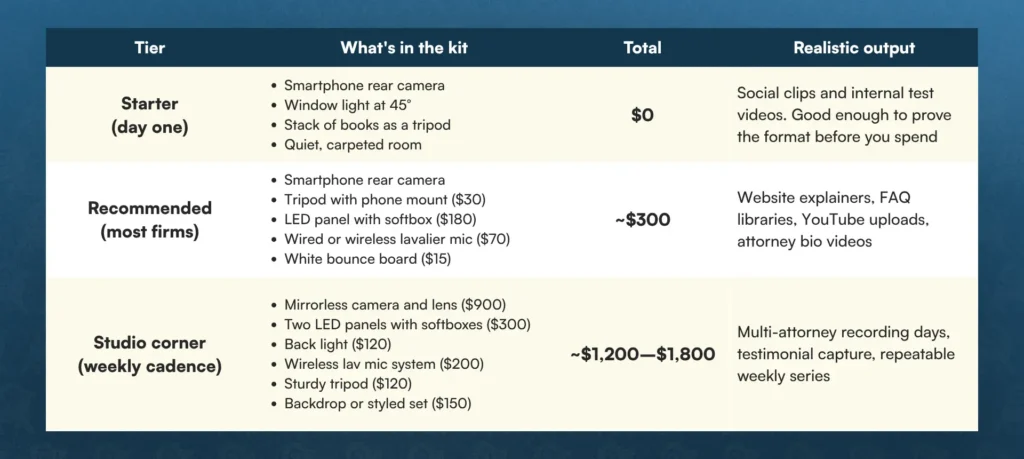
For context on where that sits: 40% of businesses spend under $5,000 a year on video production, and 76% now produce at least one video a month, according to Wistia's 2026 State of Video Report. A one-time equipment purchase in the $300 range puts a firm well below the industry's annual spend while enabling far more volume than an outsourced shoot day.
The 60-Second Pre-Record Checklist
Run this list before every take. It takes about a minute and prevents the re-shoots that kill a firm's video cadence.
- Phone or camera in horizontal orientation, rear camera selected, grid on.
- Lens at eye height, locked on a tripod. Nothing handheld.
- Framed chest-up, eyes on the upper third line, slightly off-center.
- Key light on at 45°, diffused, no glare on glasses. Overheads off.
- Fill or bounce board placed on the shadow side.
- Microphone clipped 6–8 inches below the chin, cable tucked, levels tested.
- HVAC, fans, phones, and desktop notifications off. Do Not Disturb sign on the door.
- Background clear of clutter, client names, and reflections.
- Exposure and focus tapped on your face, then locked.
- Storage and battery confirmed for the full take.
- Opening line memorized; three bullet points in view, off-camera and near the lens.
- Record three seconds of silence, then start.
After You Hit Stop: Captions, Titles, and Local Optimization
A professionally shot video still underperforms if it ships without captions, a location-specific title, and an on-page transcript. A good-looking file becomes a discoverable asset in post-production.
- Add captions to every video. 90% of video teams now ship accessibility features, and captions are the most common. Most people meet your first three sentences on a muted mobile feed.
- Put the geography in the title and description. "How long do I have to file a car accident claim in St. Louis?" outperforms "Statute of Limitations Explained" because it matches how injured people actually search.
- Publish the transcript on the page. The transcript is the text that search engines and AI answer engines can read, quote, and cite. The video alone is opaque to them.
- Cut the first three seconds tight. Open on your answer, not on a logo animation or a slow "Hi, I'm..." Educational videos under five minutes averaged about 50% engagement in Wistia's data, and viewership drops off fast.
- Design the thumbnail for a 200-pixel-wide screen. Face large, four words maximum, high contrast.
We cover where the finished video goes next, channel structure, playlists, descriptions, and end screens in our guide to YouTube marketing for lawyers.
Compliance: Confirm This Before a Personal Injury Video Goes Live
Every law firm video constitutes attorney advertising and your state's rules of professional conduct govern it. Production quality does not create exposure. Unsupported claims do. Under ABA Model Rule 7.1, a lawyer may not make a false or misleading communication about the lawyer or the lawyer's services, including anything likely to create an unjustified expectation about results, or a comparison to other lawyers that they cannot factually substantiate.
- If you show past results on screen, you generally need a disclaimer that results depend on the facts of each case. Check your state's exact wording.
- Client testimonials need written, informed consent, and many states require an additional disclaimer.
- Actor portrayals, dramatizations, and stock footage of "clients" typically require an on-screen label.
- Confirm which attorney is responsible for the content and that the firm name and a bona fide office location appear where your state requires them.
- State rules vary meaningfully. Verify against your own jurisdiction's rules, not the Model Rules, before you publish.
This section is general information about advertising rules, not legal advice on your firm's compliance obligations.
Turn Good-Looking Video Into Signed Cases
Getting the lighting, audio, and framing right clears the credibility bar. It does not, on its own, put your video in front of an injured person in your market at the moment they are choosing a firm. That takes a video program built on the questions your prospects actually search, published on pages structured to rank, distributed to the channels where your market watches, and measured against signed cases rather than views.
Rankings.io works exclusively with law firms, and we build our video service around that. We handle the keyword and question research, the scripting, the shoot direction, the on-page optimization, and the distribution, so the attorney's only job is the 90 seconds in front of the lens.
If you want the strategy layer that sits above the setup tips in this article, start with our video marketing strategy for lawyers guide, then talk to our team about what a video program would look like for your firm.
Frequently Asked Questions About Good-Looking Videos for Law Firms
Do law firm videos need a professional videographer?
No, not for most videos. A smartphone, a $180 light, and a $70 lavalier microphone produce footage that clears the credibility bar for explainers, FAQs, and attorney bios. Hire a professional crew for the three or four assets that carry the most weight: the firm brand film, client testimonials, and any commercial you plan to run as paid media. Recording the routine library in-house makes a weekly cadence financially realistic.
What is the best lighting setup for lawyer videos on a budget?
One LED panel with a softbox, positioned 45 degrees off-center at eye level about three feet away, plus a $15 white foam board on the opposite side as a bounce. That is roughly $195 total and it solves the single most visible problem in law firm video — overhead office light dropping shadows into the eyes. Add a back light later. Add a second panel only if you record two people.
How long should a law firm video be?
60 to 180 seconds for educational and FAQ videos. Wistia's 2026 State of Video Report found that engagement rises as length falls, with educational videos under five minutes averaging about 50% engagement. Attorney bios can run 90 seconds to two minutes and testimonials work best at 60 to 90 seconds. Anything longer needs a reason the viewer can feel in the first ten seconds.
Should attorneys look at the camera lens or the screen?
The lens. Looking at your own image on the screen puts your gaze a few degrees off, and the viewer reads it as someone who will not make eye contact. Put a small arrow or sticky note next to the lens as a reminder, and if you are reading from notes, place them directly beneath the lens rather than off to the side.
Is a smartphone good enough for professional law firm videos?
Yes, for the overwhelming majority of law firm videos. A smartphone from the last four years will serve most firms’ needs. The three rules: Use the rear camera rather than selfie mode, mount it on a tripod at eye height, and never rely on its built-in microphone. The camera is rarely the limiting factor. Light and sound are.
How do I stop my office from sounding echoey on video?
Record in the room with the most soft material and get the microphone close to your mouth. Reflections off glass, hard tables, and bare walls create the hollow sound. A lavalier clipped six to eight inches below the chin largely defeats them by capturing your voice before the room does. Adding a rug, curtains, or upholstered chairs to a dedicated recording corner does the rest — and costs less than a better microphone.
How often should a personal injury firm publish video?
One to four videos a month is a realistic and effective cadence for most firms, and 76% of businesses now produce at least one video monthly. Consistency matters more than volume. A firm that records eight short answers in a single 90-minute session, then publishes them weekly, will outperform a firm that produces one polished film a quarter.