Search advertising captures people who want to hire a lawyer now. Display advertising puts your firm in front of people who do not.
That single difference explains why display works brilliantly for some firms and burns money for others, and why most guides to legal Google display ads skip the part that actually decides the outcome: Google restricts the exact targeting that law firms want most in nearly every attorney practice area.
This guide covers display ads: the types available, how successful firms currently run them, the targeting rules that apply specifically to legal advertisers, how to build a campaign that works, and how to read the numbers without fooling yourself.
Key Takeaways
- Display is a reach and recall channel, not a demand-capture channel. The Google Display Network spans more than 2 million websites, videos, and apps and reaches over 90% of internet users worldwide but only a small percentage of those people need a lawyer at that moment.
- Google restricts remarketing for most legal practice areas. Google classifies abuse and trauma, commission of a crime, negative financial status, relationship hardships, and health as sensitive interest categories. Advertisers in those categories cannot use advertiser-curated audiences, which means no remarketing lists, no Customer Match, no lookalikes.
- You can still use predefined Google audiences. In-market segments, affinity audiences, demographics, life events, and location targeting remain available as workarounds, and that changes how you need to build a legal display campaign.
- One of the six types of display ads matters most. Responsive display ads generate hundreds of layouts from your assets automatically. Uploaded banners give you pixel control and no flexibility.
- Google will move display campaigns into Demand Gen. Google began prompting migrations in June 2026 and reports a 9.5% average ROI lift for advertisers who add Display inventory to Demand Gen campaigns.
- Google may inflate your display conversion numbers. View-through conversions credit your campaign when someone saw an ad but never clicked it. Standard display defaults to a one-day view-through window.
What Are Display Ads for Lawyers?
Display ads are visual advertisements: image, video, or interactive that appear on websites, apps, and Google properties while someone does something other than searching for a lawyer. You buy them through Google Ads and Google serves across its Google Display Network.
The mechanical difference from search is simple. A search ad answers a query. A display ad interrupts unrelated content. Everything else about how you plan, write, target, and measure display advertising follows from that one fact.
The scale is the appeal. Google describes the Display Network as more than 2 million websites, videos, and apps that collectively reach over 90% of internet users worldwide. For a firm trying to become the name people recognize in a metro area, that is the cheapest reach available anywhere in digital.
The scale is also the trap. Reaching 90% of internet users is only valuable if you have decided which slice of them matters, and most law firm display campaigns fail because nobody made that decision before they started spending the budget.
Display vs. Search Advertising for Law Firms
Search ads capture existing demand at a high cost per click. Display ads create awareness at a low cost per click and a much lower intent level. Neither replaces the other.
| Search ads | Display ads | |
| User state | Actively looking for a lawyer | Reading, watching, or scrolling something else |
| Trigger | Keywords the user typed | Audience, topic, or placement you selected |
| Format | Text | Image, video, HTML5, native |
| Typical cost per click | Among the highest of any industry | A small fraction of search |
| Typical click-through rate | Percentage points | Fractions of a percent |
| Best for | Signing cases now | Being remembered, staying visible, supporting other channels |
| Fails when | Budget is too small to compete on high-intent terms | Nobody defined the audience or the goal |
The right mental model: search closes, display warms.
A firm running Google Ads for lawyers at a serious level typically runs both, with display serving the brand and search serving the pipeline. A firm with a limited budget and no brand should spend on search first, every time, the priority order we lay out in our guide to law firm PPC.
Types of Display Ads
The six types of display ads available to law firms include: responsive display, uploaded image banners, native, interstitial, rich media, and video-in-display. Most legal campaigns should start with responsive display ads and add uploaded banners once they collect data worth designing against.
1. Responsive Display Ads
You upload assets (headlines, descriptions, images, logos) and Google assembles them into hundreds of layouts sized the available ad slots. This is the default format on the Display Network and the fastest way to launch.
Per Google's responsive display ad specs:
| Asset | Requirement |
| Short headlines | 1 to 5, 30 characters or fewer |
| Long headline | 1, up to 90 characters |
| Descriptions | 1 to 5, up to 90 characters |
| Business name | Required |
| Landscape image (1.91:1) | 1200 × 628 recommended, 600 × 314 minimum |
| Square image (1:1) | 1200 × 1200 recommended, 300 × 300 minimum |
| Landscape logo (4:1) | 1200 × 300 recommended, 512 × 128 minimum |
| Square logo (1:1) | 1200 × 1200 recommended, 128 × 128 minimum |
| Max asset file size | 5,120 KB |
| Video | Optional, added by YouTube link |
The catch for law firms: Google mixes and matches your assets automatically. Google might serve a headline written to pair with one image against another, and a claim that complies in one combination can mislead viewers in another. Every headline and description has to stand alone and survive any pairing, because you do not control which pairing runs.
2. Uploaded Image Ads (Banner Ads)
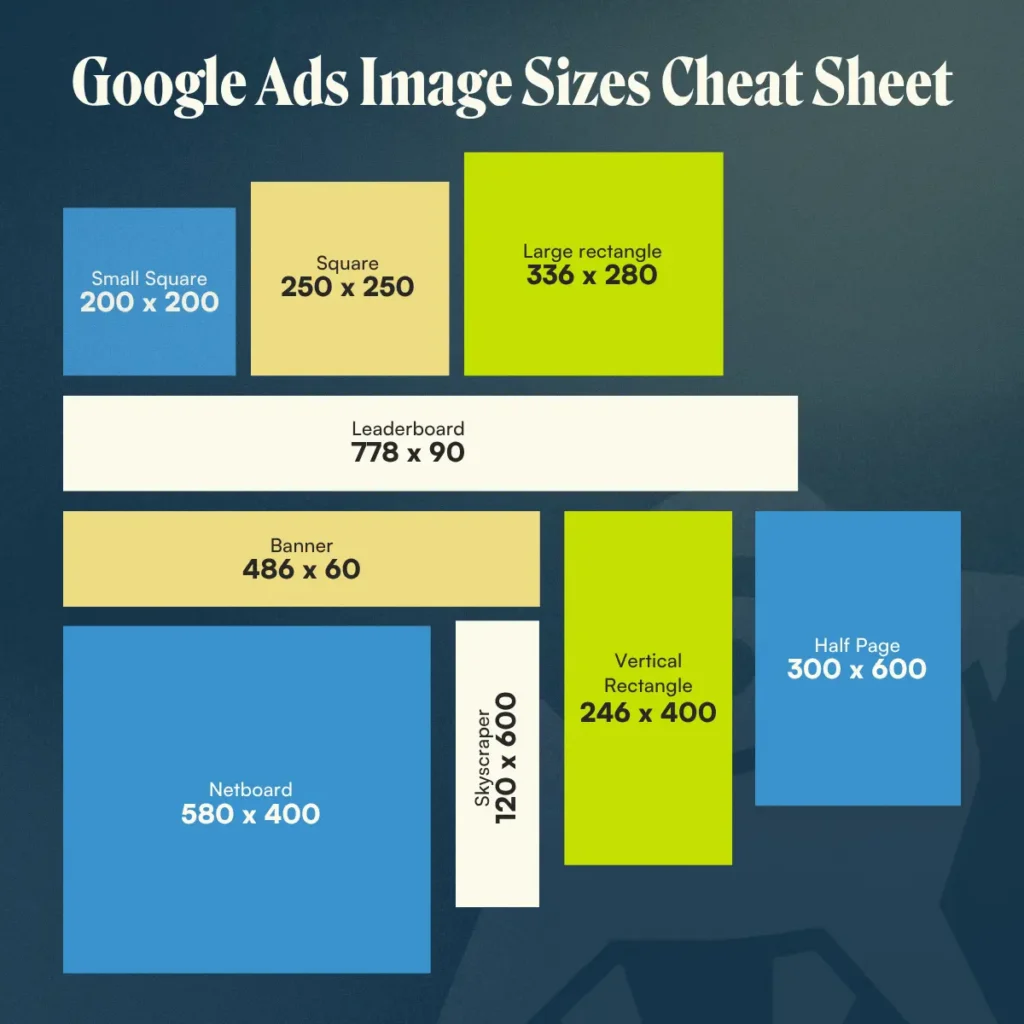
The classic format: a fixed-dimension graphic you design and upload. You control every pixel, which is exactly what a firm with real brand standards wants, and you give up the automatic sizing that fills inventory.
Google's supported image ad sizes accept GIF, JPG, and PNG files up to 150 KB:
| Category | Sizes | Notes |
| Square and rectangle | 200×200, 250×250, 300×250, 336×280 | 300×250 is the most widely available slot on the web |
| Skyscraper | 120×600, 160×600, 300×600, 300×1050 | 300×600 wins high-value sidebar inventory |
| Leaderboard | 468×60, 728×90, 970×90 | Desktop header and footer placements |
| Mobile | 300×50, 320×50, 320×100 | Where most impressions actually happen |
If you build a set, build these six first: 300×250, 336×280, 728×90, 300×600, 320×50, and 320×100. That covers the overwhelming majority of available inventory across desktop and mobile.
3. Native Ads
Native ads inherit the styling of the page they appear on, so they read as recommended content rather than advertising. They work well for content offers, a guide, a case study, an explainer, and poorly for a hard "call now" pitch.
For law firms, native carries a specific risk worth naming: A format designed to look like editorial content sits close to the line drawn by state bar rules against misleading communications. Label it clearly and make the landing page unmistakably a law firm page.
4. Interstitial Ads
Full-screen ads that appear at natural transitions in an app or between pages. High visibility, high annoyance, high accidental click rate on mobile. Useful for brand campaigns with real creative behind them, wasteful for direct response.
5. Rich Media and HTML5 Ads
Interactive units with animation, video, expandable panels, or embedded forms. Expensive to produce and genuinely effective in brand campaigns for firms with recognizable spokespeople or television creative to repurpose. Overkill for most firms.
6. Video-in-Display
Video creative serving in display placements and on YouTube. Law firms that already invest in television will often find this the strongest display asset available, because they have a library of produced video sitting unused in digital. If you have broadcast creative, cut it to 6 and 15 seconds before you commission a new banner set.
Retargeting: A Targeting Method, Not an Ad Type
Most guides list retargeting, or showing ads to previous website visitors, as a seventh ad type in most guides. It is not an ad type. It is an audience that sees any of the six ad types above.
Most law firms cannot legally do this on Google. We discuss this in the next section, and it is the most important one in this guide.
The Targeting Restriction Nobody Tells Law Firms About
Google classifies most legal practice areas as sensitive interest categories, and advertisers in those categories cannot use advertiser-curated audiences: no remarketing lists, no Customer Match, no lookalike segments. Predefined Google audiences remain available.
This is not a technicality. It is the single biggest structural constraint on legal display advertising, and the competitor guides on this topic do not mention it at all.
Google's personalized advertising policy names a list of sensitive interest categories built on the principle that ads should not target people by exploiting their difficulties, struggles, or traumatic experiences. Read that list against a law firm's practice areas:
| Practice area | Google sensitive category | What it covers |
| Personal injury, medical malpractice | Health; Abuse and trauma | Someone's status as a victim of abuse, crime, or another traumatic event |
| Criminal defense | Commission of a crime | Personal criminal record, crimes committed, allegations, or charges |
| Bankruptcy, debt, foreclosure | Negative financial status | Personal financial distress, difficulties, or deprivation |
| Family law, divorce | Relationship hardships | Personal hardships with family, friends, or interpersonal relationships |
| Mass tort, product liability | Health; Abuse and trauma | Conditions, treatments, and traumatic experiences |
Now the practical consequence:
| Audience type | Allowed in sensitive categories? |
| In-market segments | Yes |
| Affinity audiences | Yes |
| Demographics and detailed demographics | Yes, with exceptions |
| Life events | Yes |
| Location targeting | Yes |
| Topic and placement targeting | Yes |
| Custom segments | Yes, with limitations |
| Your data segments (website remarketing) | No |
| Customer Match | No |
| Lookalike / similar segments | No |
| Audience expansion | No |
Read the two tables together and the strategy writes itself. A personal injury firm cannot build a remarketing list of everyone who read its truck accident page and chase them around the internet. A bankruptcy firm cannot upload a client email list for Customer Match. A family law firm cannot build a lookalike audience from its consultation bookings.
What is left is contextual and predefined: in-market segments Google has already built, affinity audiences, life events, topic targeting, managed placements, and geography. That is a real toolkit, it is just a completely different one from the retargeting-first playbook that generic display advice assumes.
What Ads Real Law Firms Actually Run
Google publishes every ad every verified advertiser runs. The free Ads Transparency Center requires no login, and shows format, creative, and last-served date for any firm you look up.
We ran it on three of the largest advertising firms in the country on August 30, 2026:
| Firm | Domain | Ads in library (US) | What the library shows |
| Morgan & Morgan, P.A. | forthepeople.com | ~5,000 | 40 image creatives serving alongside video and search; display ads showing a "last shown" date of that same day |
| Sweet James Lawyers LLC | sweetjames.com | ~800 | Video-dominant library, consistent with a brand-led campaign |
| Thomas J. Henry Injury Attorneys | thomasjhenrylaw.com | ~200 | A tighter, more focused set across formats |
Three observations worth more than any benchmark:
- The biggest spenders run display, and they run it as brand. Morgan & Morgan's display creative leans on the same handful of assets as its broadcast and search advertising (the firm name lockup, the attorney portrait, "Free Unless We Win") and its scale claims. Nobody tries to close a case in a 300×250 ad.
- Creative volume is the strategy. Forty concurrent image creatives does not reflect indecision. It systematically tests at a scale most firms never attempt, and why the largest advertisers keep getting cheaper impressions.
- Google displayed one display creative with three variations attached — the signature of a responsive display ad. Even the firms with in-house creative teams let Google assemble the layouts.
How to Research Your Own Market in Ten Minutes
- Go to the Ads Transparency Center.
- Search the domain of the firm outspending you in your market.
- Set the region filter to your country.
- Set the format filter to Image to isolate display creative.
- Note the ad count, the last-served dates, and how many distinct creative concepts you see.
- Repeat for the next three competitors.
You now know whether competitors even contest display in your market, which firms treat it as brand, and what messages they have committed budget to. That is better competitive intelligence than any published benchmark, because it is your market and it is current.
How to Use Display Ads for Law Firms: A 7-Step Setup
Pick one job for the campaign, define a tight geography, build audiences from predefined Google segments, produce responsive display ads plus a core banner set, exclude aggressively, cap frequency, and measure on click-through conversions only.
1. Choose One Job, and Make It Measurable
Display can support brand awareness in a defined market, promote a content asset, drive attendance to a webinar or seminar, build recognition ahead of a mass tort filing, or reach referral attorneys. It cannot do all of those in one campaign, and a campaign with no stated job is the most common way legal display budgets disappear.
2. Define the Geography Before the Audience
Set the smallest geography that contains your realistic case volume — a metro, a county set, a radius. A statewide display campaign for a firm that takes cases in three counties wastes most of its budget before even considering targeting. Use location targeting set to presence, not presence-or-interest.
3. Build Audiences From What Google Allows You to Use
Given the sensitive category restrictions, start here:
- In-market segments for adjacent, permitted intent: auto insurance, legal services, moving and relocation
- Life events where relevant and permitted, such as moving or a new job
- Affinity audiences for broad brand campaigns in a defined metro
- Topic and placement targeting on local news, sports, and community sites, which are frequently the strongest legal placements
- Managed placements you select by hand, including the local outlets your prospective clients actually read
4. Produce Responsive Display Ads Plus a Core Banner Set
Launch with responsive display ads to gather data across every available slot. Once you know which placements and sizes convert, produce uploaded banners in the six sizes listed earlier so your brand looks like your brand in the placements that matter.
Write every headline to stand alone. Assume the worst possible pairing with your worst image, because eventually Google will serve it.
5. Exclude Before You Optimize
This step returns more budget than every other optimization combined:
- Exclude mobile apps and in-app inventory, unless apps are a deliberate part of the plan
- Exclude parked domains and made-for-advertising sites
- Add content exclusions for sensitive events, tragedy and conflict, and mature content
- Review the placement report weekly for the first month and exclude by hand
- Exclude your own IP ranges and current clients where the tooling permits
6. Cap Frequency
Uncapped display frequency turns awareness into irritation. In a legal context an ad that follows someone everywhere reads as predatory rather than present. Two to three impressions per user per day is a defensible starting ceiling.
7. Point the Traffic Somewhere Built for It
Display traffic arrives cold. Sending it to a search landing page built around "call now for a free consultation" produces a bounce rate that makes the whole channel look broken. Build a page that assumes no prior intent, leads with education, and offers a low-commitment next step.
This is where law firm website design not only looks good but starts to determine whether the channel works.
When Display Ads Work for Law Firms, and When They Don't
Display works when you have an established brand to reinforce, a defined market, a long consideration cycle, or an audience you can reach contextually. It fails when you ask it to generate signed cases from cold traffic on a small budget.
| Scenario | Display verdict | Why |
| Established firm building metro-wide recognition | Strong | Cheapest reach available. Compounds with every other channel and with your broader personal injury marketing |
| Mass tort or class action awareness before a filing deadline | Strong | Broad reach against a defined population. See mass tort marketing |
| B2B practice targeting in-house counsel or business owners | Strong | Contextual and placement targeting work well against professional audiences |
| Reaching referral attorneys in adjacent practice areas | Good | Small, definable audience; legal trade placements available |
| Promoting a content asset, webinar, or seminar | Good | Low-commitment offer matched to low-intent traffic |
| New firm with no brand and a $2,000/month budget | Poor | Spend it on search. You cannot buy awareness at that scale |
| Direct case acquisition from cold display traffic | Poor | Wrong channel for the job due to low intent |
| Any strategy built on website remarketing | Blocked | Sensitive category restrictions |
Measurement: Why Your Display Numbers Look Better Than They Are
View-through conversions credit your display campaign when someone saw an ad, never clicked it, and converted later through a completely different path. Judge display on click-through conversions and incrementality, not on the "All conversions" column.
Per Google's documentation on view-through conversions, the default view-through window is one day for standard display and three days for engaged-view video, adjustable from 1 to 30 days. Google excludes view-through conversions from the main "Conversions" column and reports them separately in "View-through conversions" and "All conversions."
The failure mode is predictable. Someone sees your banner on a local news site, ignores it, searches your firm name two days later, clicks the organic result, and calls. That call gets a view-through credit. The display campaign looks like it produced a case. It may have contributed. It may have contributed nothing.
Three defenses:
- Report click-through conversions as the primary number. Keep view-throughs visible but labeled as directional.
- Shorten the view-through window to one day while you evaluate whether the channel works at all.
- Test with geographic holdouts. Run display in three of six comparable markets and compare total intake — branded search volume, direct traffic, and signed cases — against the three you held out. It is the only honest measure of incrementality available at a law firm's scale.
And track this at the intake level, not the form level. A display campaign that produces 400 form fills and two signed cases fails no matter how the dashboard reads.
The 2026 Change: Display Is Moving Into Demand Gen
Google will merge Display Network buying into the Demand Gen campaign type. Migration prompts began in June 2026, with automatic migration to follow, and Display-only serving remains available for advertisers who want it.
Demand Gen combines Display inventory with YouTube, YouTube Shorts, Discover, and Gmail in a single campaign. Google reports that advertisers adding Display inventory to Demand Gen campaigns see a 9.5% average increase in ROI.
What this means practically for a law firm:
- Google will not kill standalone Display campaigns. You can still serve exclusively on the Display Network.
- Creative demands go up. Demand Gen inventory favors video. Firms with television or social video assets will position themselves well. Firms with only static banners will not.
- The sensitive category restrictions travel with you. Moving to Demand Gen does not unlock remarketing for a criminal defense or bankruptcy practice. The policy attaches to what you advertise, not to which campaign type you buy it in.
- Audit before the automatic migration lands. A campaign-type change may lose exclusions, frequency caps, and placement lists, and those settings protect your budget.
If your firm runs paid social alongside display, this consolidation is a good moment to look at the whole visual-advertising budget as one line rather than three.
Compliance: The Bar Rules That Apply to a 320×50 Banner
Every state bar advertising rule that governs your television and website copy governs your display creative, and the format gives you almost no room to satisfy them.
The recurring problems:
- Required disclaimers do not fit. Many states require disclaimers on past results, testimonials, or the phrase "no fee unless we win." A mobile banner physically cannot carry that text legibly. The answer is to keep the claim off the creative and put the full disclosure on the landing page, not to shrink the disclaimer to four-point type.
- Responsive display ads assemble themselves. ABA Model Rule 7.1 makes you responsible for false or misleading communications, and Google decides which of your headlines pairs with which image. Every asset must comply, standing alone and in any combination.
- The rules require attribution. Model Rule 7.2 requires that advertising include the name and contact information of at least one lawyer or law firm responsible for its content. Design the firm name into the creative, not just the landing page.
- Some states require an "Advertising Material" label or ad filing. Check whether yours does before a campaign launches, not after.
- Targeting choices carry ethical weight. Even where Google technically permits a targeting method, targeting people in acute crisis can run into your state's solicitation rules. Google's sensitive category restrictions and your bar's solicitation rules are two separate gates, and you have to pass both.
Our guide to attorney advertising rules covers the state-by-state layer in detail. When the two conflict, the bar rule wins. Google will not defend your license.
The Bottom Line
Display advertising is the cheapest reach a law firm can buy and the easiest budget a law firm can waste. Both are true, and you must decide which one you get before a single impression serves.
The firms that make it work start from an honest premise: Display will not sign cases directly. It makes your name familiar, so that when someone does search — and they will search — your firm is the one they recognize among three blue links. Morgan & Morgan runs forty display creatives at once because familiarity is the asset, not the click.
The firms that waste budget do the opposite: They launch a remarketing campaign that policy will not permit, point cold traffic at a conversion page, and read view-through conversions as case volume.
So: Pick one job. Keep the geography tight. Build audiences from what Google actually allows a legal advertiser to use. Exclude ruthlessly, cap frequency, and judge the channel on clicks and signed cases rather than impressions and view-throughs.
And keep it in proportion to the rest of the plan. Display supports demand capture — it does not replace it. The cases come from search, law firm SEO, and Local Services Ads, and display makes each of them work a little harder. That balance across marketing channels for attorneys is the actual strategy. Display is one instrument in it.
If you want an outside read on whether display belongs in your firm's mix at all — and an honest answer if it does not — talk to our team.
Frequently Asked Questions About Display Ads for Law Firms
How do I use display ads for a law firm?
Pick one measurable job for the campaign, set the smallest geography that covers your real case volume, and build audiences from the predefined Google segments legal advertisers are permitted to use: in-market segments, affinity audiences, life events, topics, and managed placements. Launch with responsive display ads, add uploaded banners in the six highest-inventory sizes once you have data, exclude mobile apps and low-quality placements aggressively, cap frequency at two to three impressions per user per day, and send the traffic to an educational landing page rather than a hard conversion page.
Can law firms run retargeting ads on Google?
Usually not. Google classifies abuse and trauma, commission of a crime, negative financial status, relationship hardships, and health as sensitive interest categories, and advertisers promoting content in those categories cannot use advertiser-curated audiences. That rules out website remarketing lists, Customer Match, lookalike segments, and audience expansion for most personal injury, criminal defense, bankruptcy, family law, and mass tort advertising. Predefined Google audiences — in-market, affinity, demographics, life events, and location — remain available.
How much do display ads cost for law firms?
Cost per click on the Display Network is a small fraction of legal search, which consistently costs more than most verticals in paid search. The meaningful number is not cost per click, though — it is cost per signed case, and that figure is far worse on display than on search because the traffic has no intent. Budget display as a brand line item you can sustain for six to twelve months in a defined market, not as a channel expected to return cases in month one. Our guide to setting a law firm marketing budget covers how to size that line against the rest of the plan.
What size should law firm display ads be?
Build these six first: 300×250, 336×280, 728×90, 300×600, 320×50, and 320×100. Between them they cover the large majority of available desktop and mobile inventory. Google accepts GIF, JPG, and PNG files up to 150 KB. If you run responsive display ads instead, supply a 1200×628 landscape image, a 1200×1200 square image, and both logo formats.
Do display ads work for personal injury law firms?
They work for established firms building recognition across a defined metro, and for mass tort or class action awareness campaigns with a deadline behind them. They do not work as a direct case acquisition channel, and they do not work at all for a new firm with a small budget without established brand recognition. The restriction on remarketing removes the tactic most personal injury firms would otherwise reach for first, which makes contextual placement targeting and geography the levers that matter.
Are display ads better than search ads for lawyers?
No. They do different jobs. Search ads capture people actively looking for a lawyer at a high cost per click and a high conversion rate. Display ads build familiarity among people who are not looking yet, at a low cost per click and a very low conversion rate. A firm that must choose only one should choose search. A firm with an established search program and budget beyond it should add display to reinforce the brand that makes search cheaper.
What will change with Google Display campaigns in 2026?
Google will integrate Display Network buying into the Demand Gen campaign type, which also spans YouTube, YouTube Shorts, Discover, and Gmail. Migration prompts began in June 2026, with automatic migration to follow, and advertisers can still choose to serve exclusively on the Display Network. Google reports a 9.5% average ROI increase for advertisers who add Display inventory to Demand Gen campaigns. The practical effect for law firms is a higher demand for video creative, and a need to audit exclusions and frequency caps before an automatic migration overwrites them.
How do I know if my display ads actually work?
Report click-through conversions as your primary metric and treat view-through conversions as directional only. Google's default view-through window is one day for standard display, and a view-through credits your campaign even when the person never clicked the ad and converted through an entirely different path. The most reliable test at a law firm's scale is a geographic holdout: Run display in half of a set of comparable markets, hold it out of the other half, and compare total intake, branded search volume, and signed cases across both.